ENTERPRISE HEALTHCARE UX RESEARCH | PAYMENT INTEGRITY | CLAIM AUDIT WORKFLOW
Claim Audit Platform (CAP)
Clinical analysts were juggling eight-plus disconnected systems and apps to complete a single audit. The friction was costing $20M a year. I mapped the breakdown — and helped build the way out.
$20M
Est. annual savings
15 Sec
Saved per task
91.4
SUS excellent usability
+9.7
SUS improvement
Project overview
Clinical analysts at UnitedHealth Group's Payment Integrity division were doing skilled, high-stakes work in a broken environment. To complete a single claim review, they moved between PICTS, Encoder Pro, Facets, and a stack of supporting reference documents — constantly context-switching, manually validating information, and losing time they couldn't afford to lose.
I was brought in as lead UX researcher to understand exactly where the workflow was breaking down and why. The goal wasn't just to improve usability — it was to consolidate a fragmented analyst experience into a single platform that could eliminate unnecessary steps, reduce handling time, and save the organization an estimated $20M a year — the cost the business attached to the fragmented process.
The result was a redesigned Claim Audit Platform that earned a 91.4 SUS score (Grade A — Excellent), 100% task success in testing, and quotes from analysts saying it would replace the tools they'd relied on for years.
Role: Lead UX Researcher
Methods: User Interviews, Field Observation, Usability Testing, Microsoft Desirability Test
Stakeholders: Payment Integrity, Optum Insight, Optum Tech
Impact: estimated $20M annual savings, 15 sec saved per task, 91.4 SUS score
My contributions
I led this project as the sole researcher, working across four methods — interviews, field observation, usability testing, and a desirability assessment — to build a complete picture of the analyst experience from the inside out.
The most important early decision was to observe analysts in their actual work environment, not just interview them. Self-report alone wouldn’t have revealed the full extent of the context switching — I needed to watch it happen in real time to understand how costly it truly was. That field observation became the backbone of the workflow model and the day-in-the-life video that aligned stakeholders around the redesign priorities.
I collaborated with six designers throughout, translating research findings into actionable recommendations on feature prioritization, terminology, information hierarchy, and workflow consolidation. I also used AI tools deliberately throughout — an internal AI bot for business context, ChatGPT to accelerate documentation, and Miro AI to cluster usability findings — so my time stayed focused on the interpretive and strategic decisions that required a researcher’s judgment.
When testing came back with a 91.4 SUS and 100% task success, the data confirmed what analysts had told us directly: “I don’t think we’d need Encoder Pro if we have this.”
Why this matters
$20M
Potential annual savings
Clinical analysts navigated multiple disconnected systems to complete claim reviews, creating workflow inefficiencies, context switching, and increased handling time.
PAIN POINT
Analysts relied on multiple disconnected systems, creating workflow inefficiencies and increased handling time.
OPPORTUNITY
Integrate critical claim review information into one streamlined auditing experience.
BUSINESS RISK
Workflow inefficiencies increased handling time and reduced analyst productivity.
Research approach with AI-enhanced activities
Mapping a day in the life
A workflow model created from interviews and observation sessions to understand how analysts navigated multiple systems throughout claim review activities.
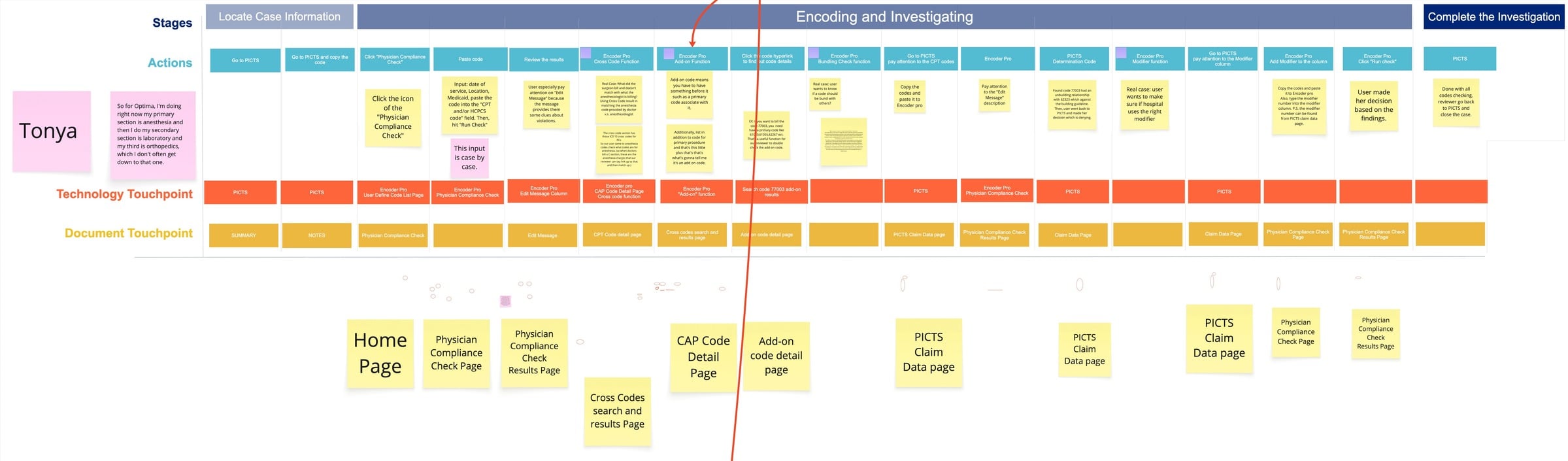
Workflow mapping revealed extensive context switching between PICTS, Encoder Pro, CAP, and supporting resources during a single claim investigation.
Analysts frequently moved between systems to locate supporting information.
Critical information was distributed across multiple platforms and documents.
Consolidate commonly used tools and decision-support content into a unified workflow.
Visualizing the analyst experience
A researcher-produced video that follows an analyst through an actual day — built from the interviews and field observations.
Day-in-the-life video — following a claim analyst through an actual day
Why this artifact mattered
Stakeholders understood the problems on paper — but watching the friction unfold made it visceral. Seeing an analyst juggle systems and hunt for information in real time moved the room from “interesting findings” to “we need to fix this” — and anchored the redesign priorities in something everyone had now seen for themselves.
• Communicated analyst pain points beyond a written report
• Made workflow friction visible to product and design partners
• Supported alignment around CAP redesign priorities
Key research insights
Analysts relied on multiple disconnected systems.
Clinical analysts frequently switched between tools to complete a single claim review, increasing workflow complexity and reducing efficiency.
Search was essential but unreliable.
Users depended heavily on search functionality, but inconsistent search behavior made it harder to locate critical information quickly.
Context mattered as much as data.
Analysts needed supporting context, not just extracted information, to validate findings and make confident audit decisions.
Cross-platform navigation created unnecessary friction.
Logging into external systems and manually validating information consumed valuable time during claim reviews.
From fragmented workflow to unified experience
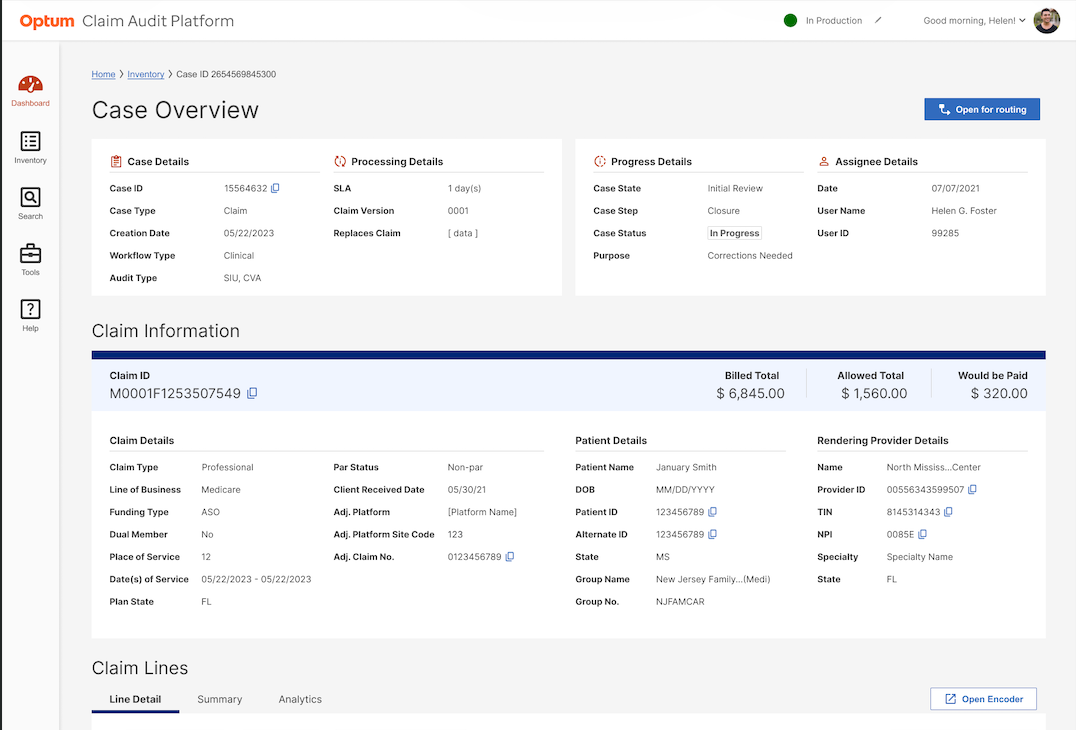
Research revealed that analysts relied on multiple disconnected tools, manual validation processes, and dense reference systems. The redesigned CAP experience consolidated critical information into a more efficient and streamlined workflow.
Encoder Pro legacy experience
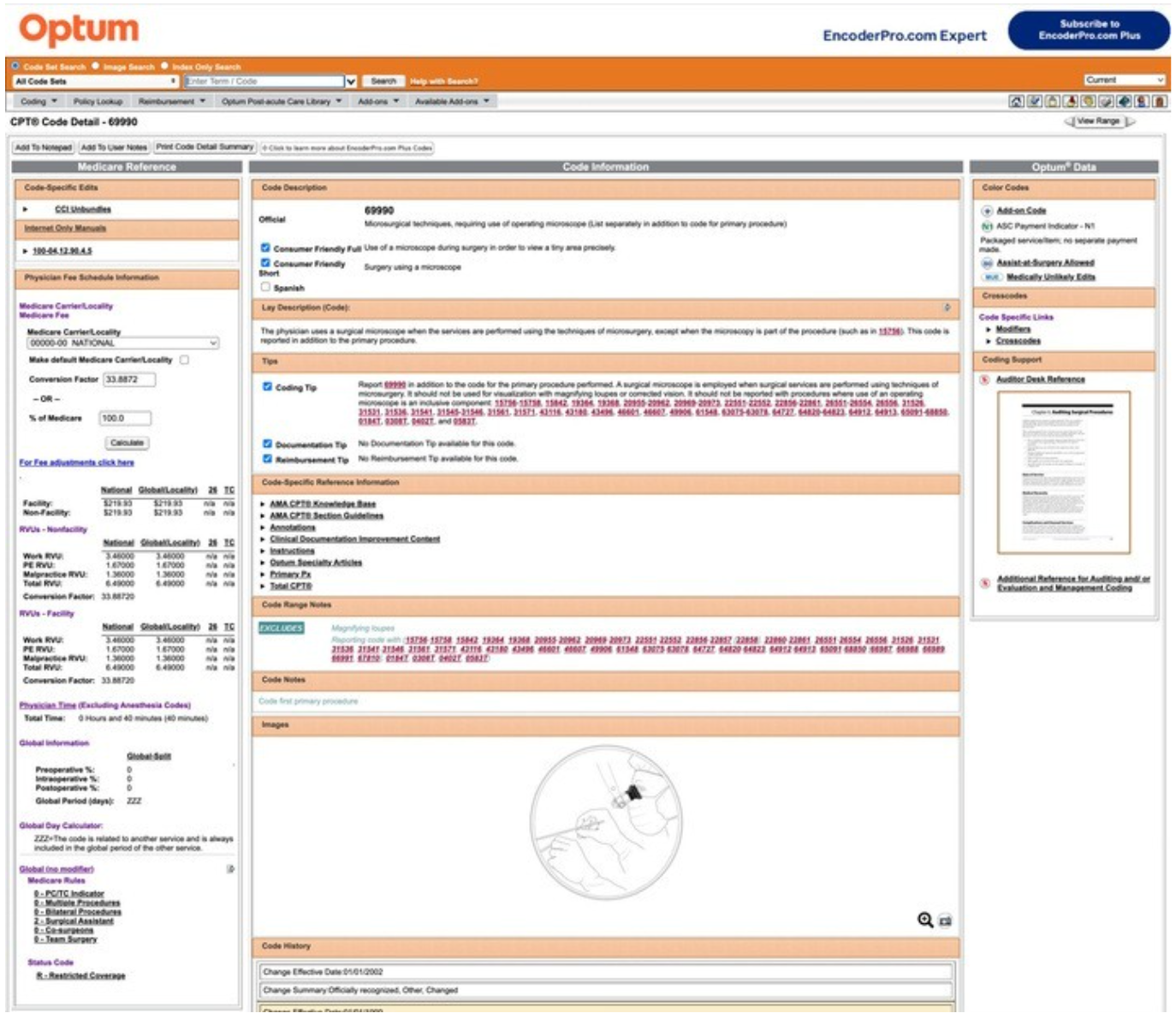
Analysts relied on a dense reference tool with multiple panels, external references, and high visual complexity.
Claim Audit Platform integrated design
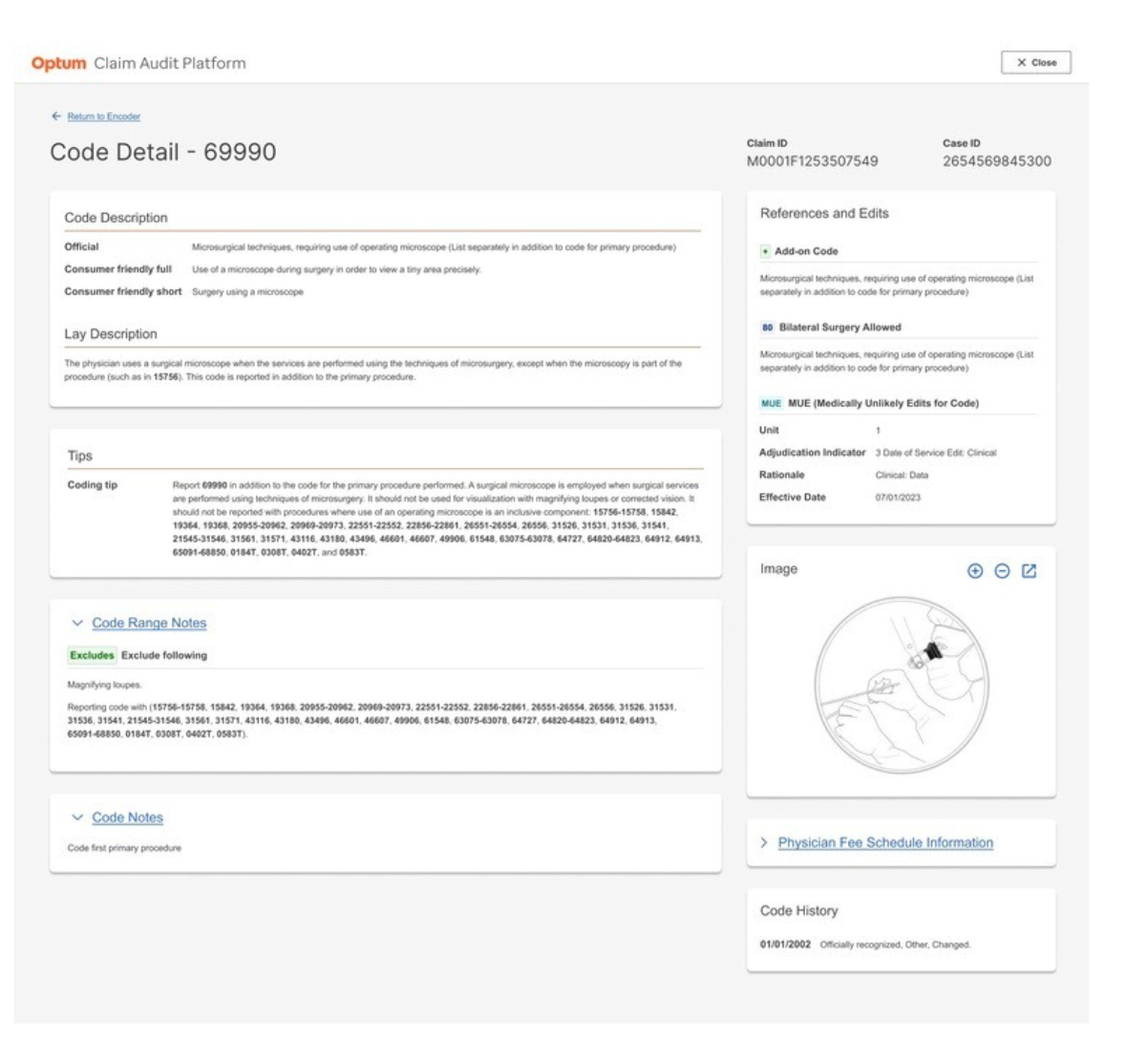
Research findings informed a streamlined workflow that surfaced key information and reduced unnecessary navigation.
Research impact
Reduced information overload
Prioritized critical claim review information and improved visual hierarchy.
Consolidated reference materials
Integrated commonly used Encoder Pro and CDF resources into the auditing workflow.
Improved discoverability
Made essential information easier for analysts to locate and interpret.
Reduced context switching
Decreased reliance on multiple external systems during claim review.
Testing and iteration
Step 1
MVP usability testing
Evaluated how effectively analysts could complete claim review tasks in the integrated CAP prototype.
Step 2
Analysis
Reviewed the session recordings and grouped friction points by how often they occurred and how much they slowed the task.
Step 3
Design recommendations
Improved terminology, enhanced information visibility, and prioritized missing functionality.
Qualitative synthesis
I used Miro AI to cluster the qualitative data from usability testing into recurring experience themes — a fast, structured read on what analysts valued in the interface and where it fell short.
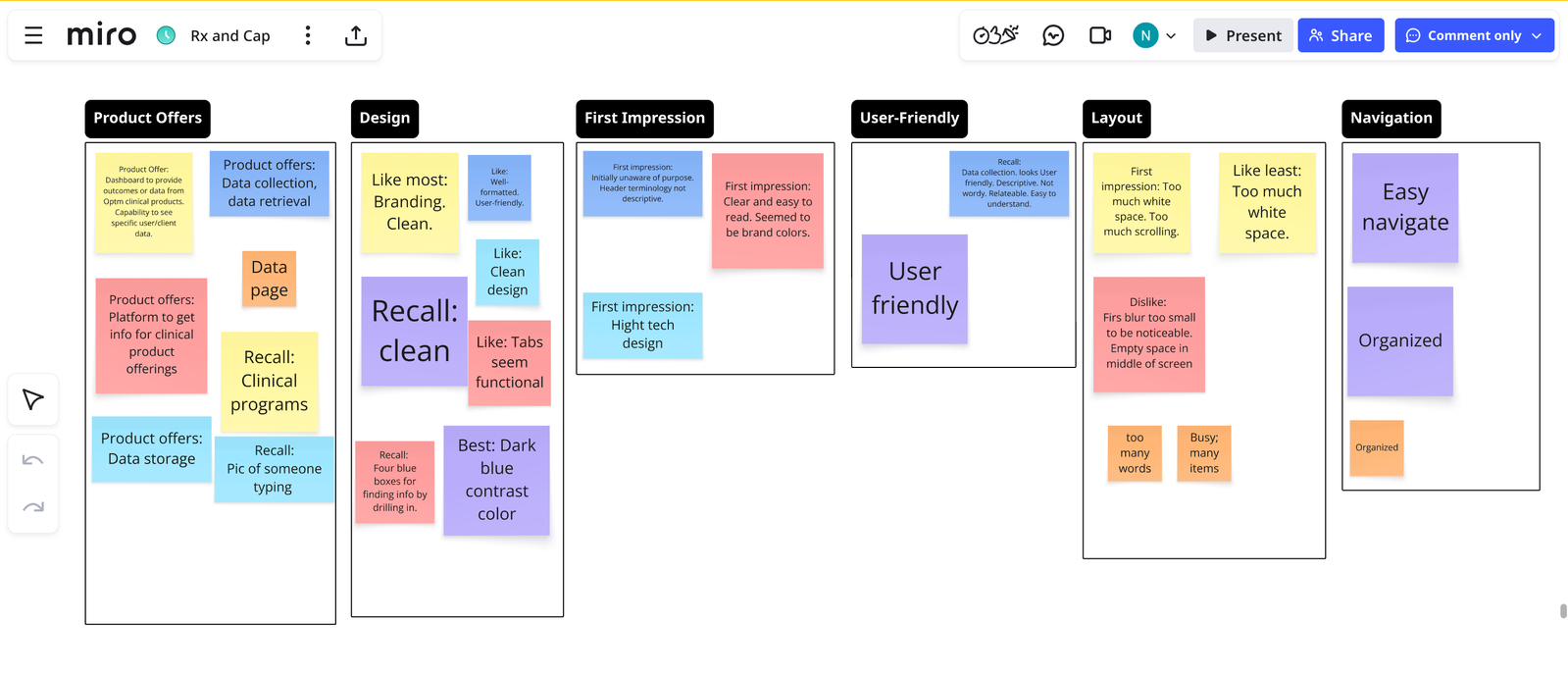
Miro AI supported organizing usability findings.
What the AI clustering surfaced
Feeding raw session notes into Miro AI grouped scattered reactions into clear themes far faster than manual tagging — and I reviewed and refined every grouping before trusting it.
• Recurring themes such as product, design, first impressions, usability, layout, and navigation.
• Clustering made it clear which themes carried the most weight — and where to focus first.
• Those priorities point to the specific usability findings detailed below.
Usability testing findings
Open Encoder tab was hard to find
Only one participant located the tab without assistance; others either missed it or needed additional time.
Terminology was unclear
Users found abbreviations such as "PX" and "Claim HX" confusing.
Missing information reduced confidence
Users wanted additional decision-support content, including Crosswalk, Includes Codes, and a full list of primary procedure codes.
Streamlined workflow was well received
The prototype's workflow was user-friendly and intuitive — easier than switching across multiple tools to complete a review.
Research validation
Quantitative results
91.4
SUS score · Grade A (excellent)
0–100 SUS scale
5.5 /7
Task ease
4.8 /7
Confidence
100%
Task success
6 analysts · 1:1 moderated sessions
Qualitative feedback
Satisfied
Adequate
Organized
Effective
Effortless
Sufficient
Confident
Participants picked up to four words from a list of 16 — their feedback on the overall experience was tremendously positive.
I don't think we'd need Encoder Pro if we have this — fewer applications open, and since we can also look at history, we wouldn't need Facets either. It eliminates steps.
— Participant 5
It's [the Claim Audit Platform that gives me] exactly the information I need to do my job — Encoder has a lot more that someone else at Optum might need, but not me.
— Participant 6
Outcomes & business impact
$20M
Est. annual savings
91.4
SUS score
+9.7
SUS improvement
15 Sec
Saved per task
Grade A
Excellent usability
Reduced
Workflow friction
Reflection
What worked
Combining interviews, workflow observations, contextual inquiry, and usability testing helped connect analyst pain points directly to workflow and prototype decisions.
What I learned
Enterprise workflow design requires understanding not only what information users need, but when, where, and why they need it during decision-making.
What I would improve
I would expand testing across more claim scenarios and track post-launch behavioral analytics to measure long-term workflow efficiency.
More research
Each project tells a different part of the story.
Member Touchpoint Optimization
$22.6M revenue protected
Uncovered the systemic causes of member-communication overload.
View case study → Effectiveness Study · Higher EducationDoes concept mapping earn its place?
Kept pace · r = .65 map-to-grade
A controlled comparison testing whether a note-taking tool helps international students keep pace.
View case study → B2B · Internal Analyst ToolHealthcare Explorer Redesign
89% positive · 3 urgent fixes shipped
Caught the silent failures a satisfaction score missed — and shaped the AI feature.
View case study →